A version of this feature is also available in the ConnieRTC Plugin Library. If you prefer to use the Plugin Library version alongside the template, please remove this feature from your instance of the template to prevent conflicts.
Canned Responses — Overview
The Canned Responses feature gives Connie agents a per-account library of pre-written replies they can insert or send into the active conversation in one click. Each Connie sub-account ships with its own library — content is fully customizable per client.
The library is delivered by a Twilio Serverless function (chat-responses.js) reading a single JSON asset (responses.private.json) hosted in each account's own serverless runtime. The Flex plugin renders the library either in the CRM Panel (table of categorized responses with Insert + Send buttons) or as a dropdown beneath the Message Input Actions, depending on per-account config.
When to use this feature
- Volume-driven channels. Donor services, intake, volunteer inquiries, ticket triage — anywhere the same questions repeat dozens of times a day.
- Brand-consistency-sensitive accounts. Donor receipts, program eligibility language, partner referrals — places where wording matters and ad-hoc replies risk drift.
- New-agent onboarding. Reduces ramp time; a new agent can answer correctly on day one without memorizing program names or contact details.
Agent experience
Two placement modes (set per-account in flex-config):
CRM Panel
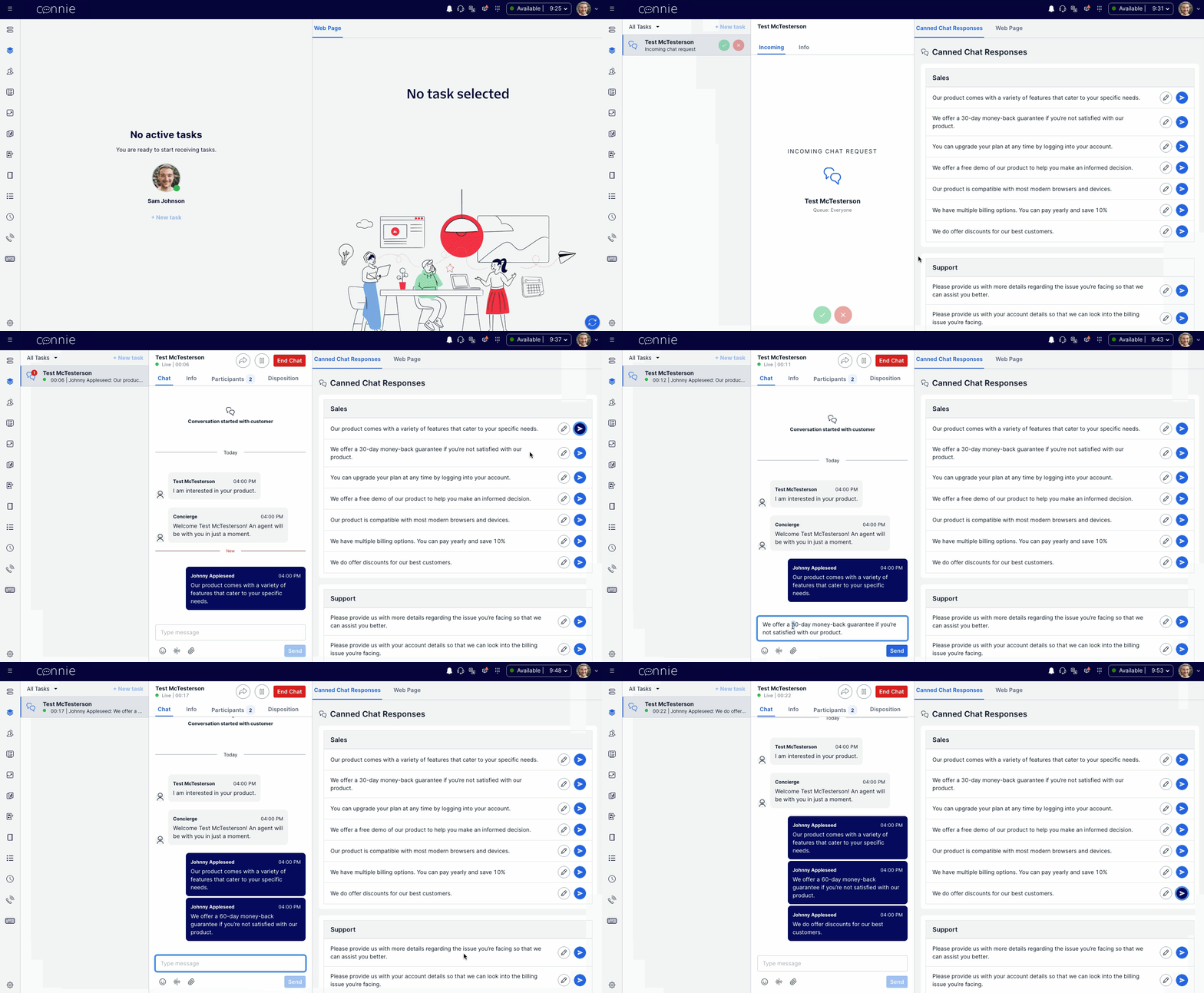
When location: "CRM" is set, the canned responses render in the right-hand CRM Panel during an active task. Each response has two buttons:
- Insert — appends the response text to the message composer using the
SetInputTextaction. Agent can edit before sending. - Send — sends the response directly into the active conversation using the
SendMessageaction.
Account constraint: if Enhanced CRM Container is enabled on the account (Connie's hosted CRM iframe — enhanced_crm_container.enabled: true), the CRM Panel slot is occupied. In that case, use Message Input Actions placement instead, or expose Canned Responses as a tab inside Enhanced CRM (advanced).
Message Input Actions
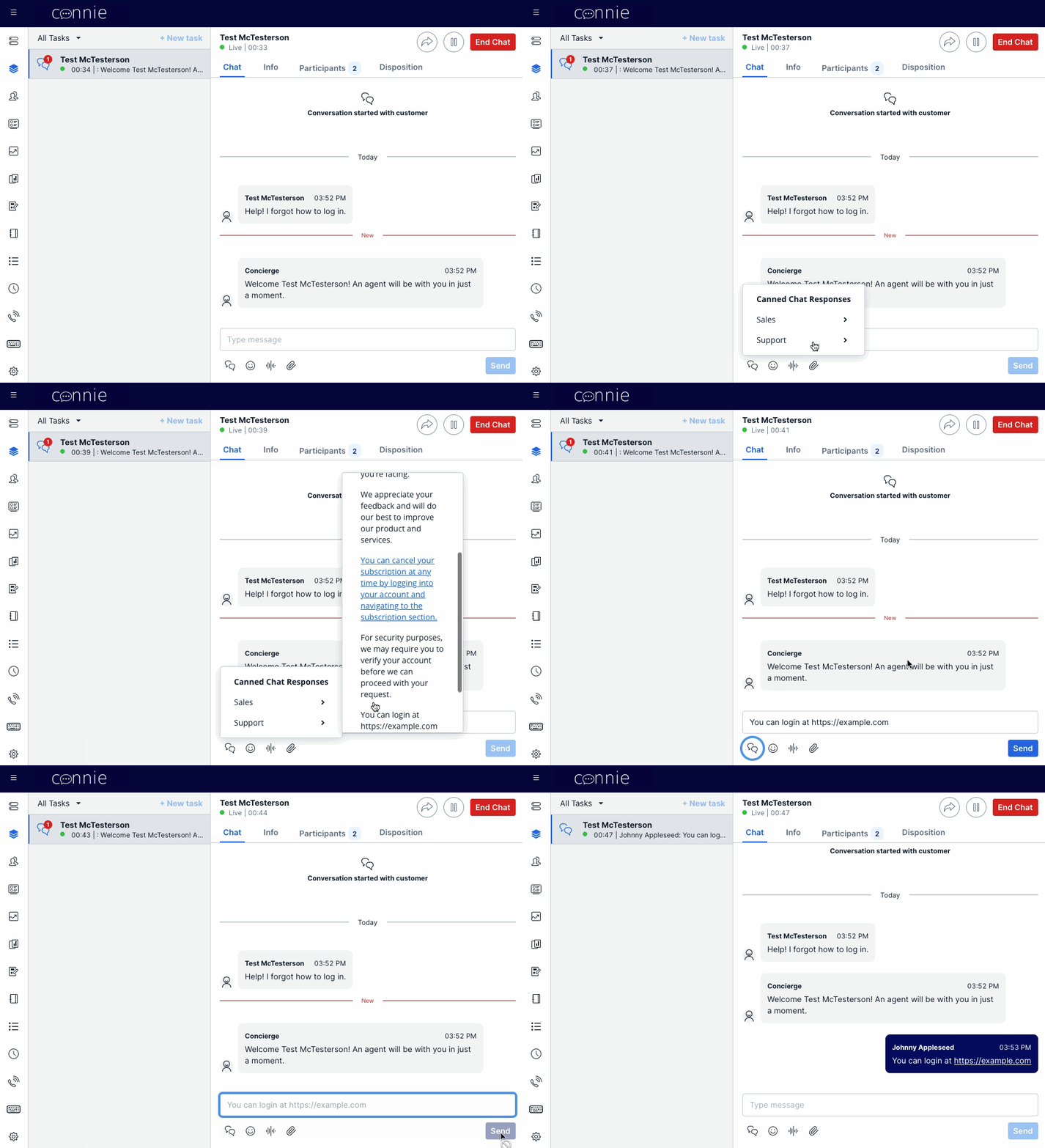
When location: "MessageInputActions" is set, canned responses render as a dropdown beneath the message composer. Clicking a response Inserts it into the composer (no auto-send). Compatible with Enhanced CRM Container.
Channel coverage
| Channel | Insert | Send | Notes |
|---|---|---|---|
| Chat (Webchat, SMS-in-Flex) | ✅ | ✅ | Native — read/writes state.flex.chat.conversationInput |
| Email tasks | ✅ | ⚠️ "Send" delegates to Insert | Email composer requires agent to confirm Subject/To/CC via Flex's native Send affordance |
| Voice | ❌ | ❌ | Voice tasks have no message composer |
The Send button on an email task does not auto-dispatch the email — it falls back to Insert behavior so the agent uses Flex's native email Send (which validates Subject/To). This is intentional and codified in Response.tsx.
How the content is wired
┌─────────────────────────────────────────────────────────────────┐
│ Source repo (one file, deployed per account)                    │
│   basecamp-v26.02/serverless-functions/src/assets/              │
│     features/canned-responses/responses.private.json            │
└─────────────────────────────────────────────────────────────────┘
                            │
                  ENVIRONMENT=<account> npm run deploy
                            │
                            ▼
┌─────────────────────────────────────────────────────────────────┐
│ Per-account Twilio Serverless runtime asset                     │
│   https://custom-flex-extensions-serverless-<id>.twil.io/       │
│     features/canned-responses/responses.json                    │
└─────────────────────────────────────────────────────────────────┘
                            │
                            │ fetched by chat-responses.js
                            ▼
┌─────────────────────────────────────────────────────────────────┐
│ Flex plugin renders the dropdown / CRM panel                    │
│   plugin-flex-ts-template-v2/src/feature-library/               │
│     canned-responses/                                           │
└─────────────────────────────────────────────────────────────────┘
Each Connie sub-account has its own serverless runtime — there is no shared content layer. Deploying canned responses to Lifeline does not affect NSS, CCT, HHOVV, or any other account's runtime.
Runbooks
| Runbook | When to use |
|---|---|
| Setup | Replacing the default placeholder canned responses with a client's custom library on an account that has never had custom content before. |
| Change | Updating an existing custom canned-responses library for a client (add/remove/edit responses or sections). |
| Cancel | Disabling Canned Responses on an account. |
| Troubleshoot | Library appears empty, wrong content, or Insert/Send doesn't work. Filename + path gotchas for future agents. |
Reference
- Existing implementation page (technical details + Twilio Professional Services upstream): legacy canned-responses doc
- Source plugin component:
plugin-flex-ts-template-v2/src/feature-library/canned-responses/custom-components/CannedResponsesCRM/Response/Response.tsx(handles both chat and email task channels) - Source serverless function:
serverless-functions/src/functions/features/canned-responses/flex/chat-responses.js